The VIVO Dual Vertically Stacked Ultrawide Monitor Desk Mount review is for anyone trying to fit two unusually large displays into a vertical arrangement while keeping the desktop clear.
Its broad screen and weight limits are the draw, but compatibility with your VESA pattern and desk thickness should guide the buying decision.
VIVO Dual Mount Review Summary
The quick verdict
2,000+ ratings
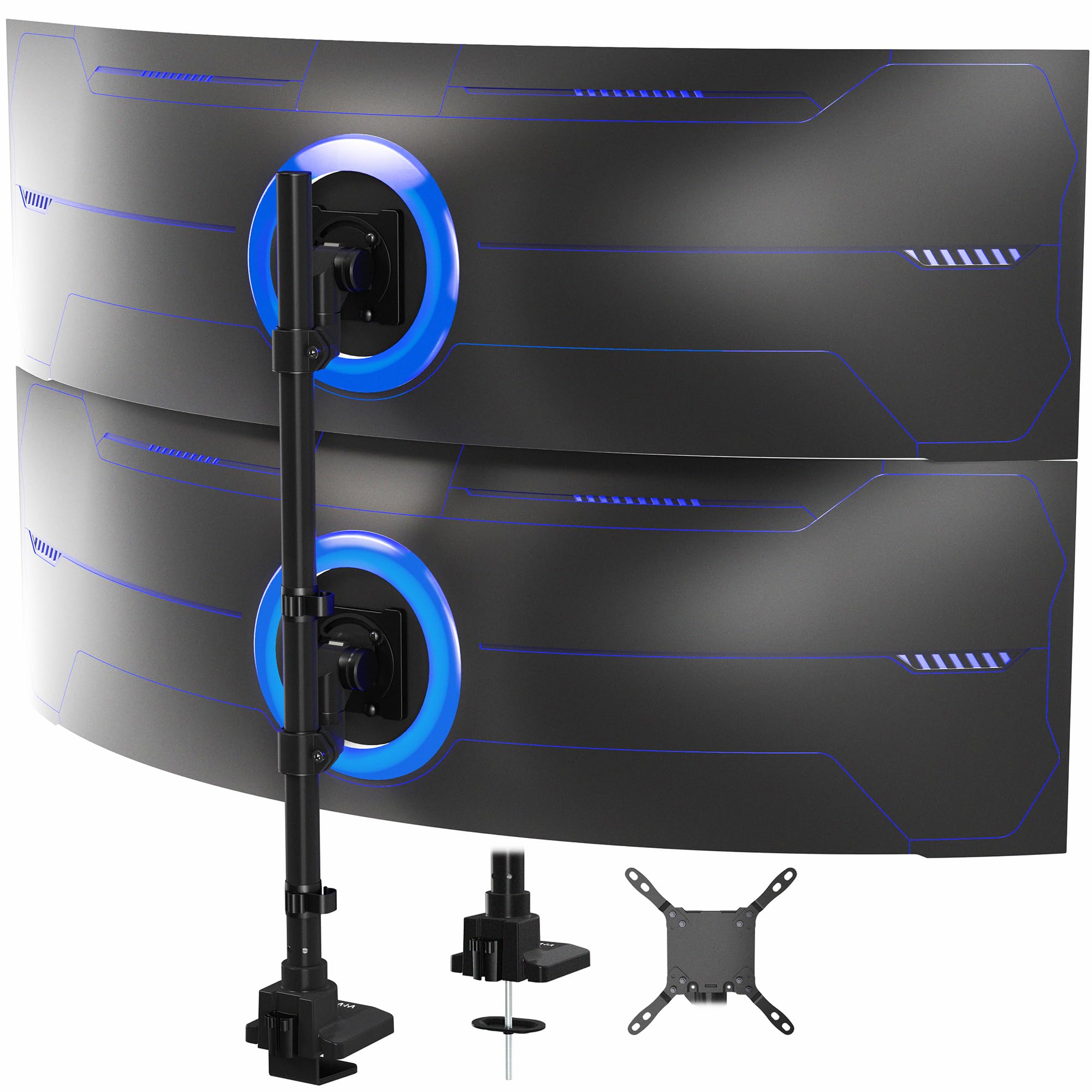
Read Amazon ReviewsVIVO STAND-V257R Dual Ultrawide Monitor Mount
A desk-clamped option for people building a vertically stacked setup with two large ultrawide screens or compatible TVs.
- Holds two ultrawide screens in a vertical stack, each up to 57 inches.
- Supports up to 48.4 pounds per curved screen or 59.4 pounds per flat screen.
- Also lists compatibility with TVs up to 43 inches.
- Adjusts with +55° to -35° tilt, up to 132° swivel on the bottom arm, and 360° swivel on the top arm.

Pros
- Accommodates two ultrawide displays up to 57 inches each.
- Provides different weight limits for curved and flat screens, reaching up to 59.4 pounds per flat screen.
Consider before buying
- The clamp and grommet options have different desk-thickness limits, so the mounting surface needs checking before purchase.
- The listed VESA patterns top out at 200x200 mm; confirm that each display’s mounting holes match.
Read the full review summary
The STAND-V257R is designed for two vertically stacked ultrawide displays, supporting screens up to 57 inches and a combined load dictated by a per-screen limit of up to 48.4 pounds for curved displays or 59.4 pounds for flat displays.
It also lists compatibility with TVs up to 43 inches. That makes it a specialized option for large-screen workstations where ordinary dual-monitor arms may not offer enough size capacity.
The mount attaches with a heavy-duty C-clamp to surfaces up to 1.45 inches thick, or with the optional grommet mount on surfaces up to 1.26 inches thick.
Its detachable VESA plates, center-pole height adjustment, and multiple movement options help with positioning, while pole clips route cables.
Before choosing it, check each screen’s weight, mounting-hole pattern, desk edge or grommet opening, and the vertical space available for stacking.
The buying factors
VIVO Dual Mount Scorecard
Editorial scores reflect listed features and buyer fit; they are not laboratory measurements or customer ratings.
Large-screen compatibility
Supports two ultrawide screens up to 57 inches, with distinct weight limits for curved and flat displays.
Adjustment range
Tilt, swivel, rotation, and pole height adjustment provide several ways to tailor the display positions.
Mounting flexibility
Offers clamp and grommet installation, though each option has a specific maximum surface thickness.
VESA coverage
Supports five listed VESA patterns, including several 200 mm layouts.
Desk organization
Center-pole cable clips offer a simple route for power and AV cords.
Setup fit
Detachable VESA plates can make screen attachment more manageable, but large displays still call for careful compatibility checks.
Key Features and Specifications of VIVO Dual Mount
- Holds two ultrawide screens in a vertical stack, each up to 57 inches.
- Supports up to 48.4 pounds per curved screen or 59.4 pounds per flat screen.
- Also lists compatibility with TVs up to 43 inches.
- Adjusts with +55° to -35° tilt, up to 132° swivel on the bottom arm, and 360° swivel on the top arm.
- Offers 180° rotation on the bottom arm and 360° rotation on the top arm, plus height adjustment along the center pole.
- Attaches with a heavy-duty C-clamp to surfaces up to 1.45 inches thick or an optional grommet mount on surfaces up to 1.26 inches thick.
- Detachable VESA plates support 75x75, 100x100, 200x100, 100x200, and 200x200 mm patterns; clips on the center pole help organize cords.
Pros and Cons of VIVO Dual Mount
Pros
- Accommodates two ultrawide displays up to 57 inches each.
- Provides different weight limits for curved and flat screens, reaching up to 59.4 pounds per flat screen.
- Combines several movement options with height adjustment along the pole.
- Offers both clamp and grommet mounting, with detachable plates for screen installation.
Consider before buying
- The clamp and grommet options have different desk-thickness limits, so the mounting surface needs checking before purchase.
- The listed VESA patterns top out at 200x200 mm; confirm that each display’s mounting holes match.
- A vertical arrangement requires sufficient desk-to-ceiling clearance and a screen layout that suits your viewing position.
Who Should Buy VIVO Dual Mount?
Good fit
Consider this mount if you specifically want two large ultrawide screens stacked vertically and have already verified that both displays fall within the relevant size and weight limits.
Its higher capacity for flat screens and support for multiple VESA patterns give large-display owners more room to find a fit than a typical arm intended for smaller monitors.
It may also suit a workspace using compatible screens that need occasional repositioning. The top and bottom arms have different swivel and rotation ranges, so plan how each display will be oriented and moved before installation.
The detachable VESA plates can make it easier to attach a screen before placing it on the mount.
Measure the intended mounting area and confirm the desk thickness for the clamp or grommet option. Also check the weight of each screen, its VESA spacing, and the total vertical clearance with both displays installed.
A careful fit check matters more here because the screens may be substantially larger than conventional dual-monitor setups.
Who should skip it
Skip this model if you want side-by-side displays, a freestanding base, or a mount for smaller standard monitors. Its defining design is a vertically stacked pair of large screens secured to a desk.
Look elsewhere if your desk falls outside the listed thickness limits or either screen exceeds the supported weight, screen-size, or VESA specifications. Those measurements determine whether this mount is a viable match.
How the VIVO Dual Mount fits a large-screen desk
Capacity for two ultrawide displays
The 57-inch screen limit is the standout feature, but size alone does not establish fit.
Weigh each display and use the correct capacity for its panel type: up to 48.4 pounds for a curved screen or 59.4 pounds for a flat one.
A screen that is under the size limit can still exceed its applicable weight ceiling.
What the movement options mean
The mount gives the two positions different ranges: the bottom arm swivels up to 132° and rotates 180°, while the top arm swivels and rotates 360°. Both have tilt adjustment, and the center pole provides height adjustment.
Consider how those distinct ranges suit your planned arrangement, particularly if you expect to change orientation or angle after setup.
Desk attachment and clearance
The C-clamp supports surfaces up to 1.45 inches thick; the optional grommet mounting point supports surfaces up to 1.26 inches thick. Measure the location you plan to use, including any underside features that could interfere with attachment.
Since the screens stack, check the full vertical envelope and your seated sightline before committing to the layout.
VESA fit and cable routing
The detachable plates support 75x75, 100x100, 200x100, 100x200, and 200x200 mm patterns. Compare those measurements with the mounting holes on both displays, then check whether their rear shape leaves room for the plates.
Clips on the center pole help organize power and AV cords as they run between the screens and desk.
Alternatives to VIVO Dual Mount
Computer Monitor Arms alternative
3,000+ ratings
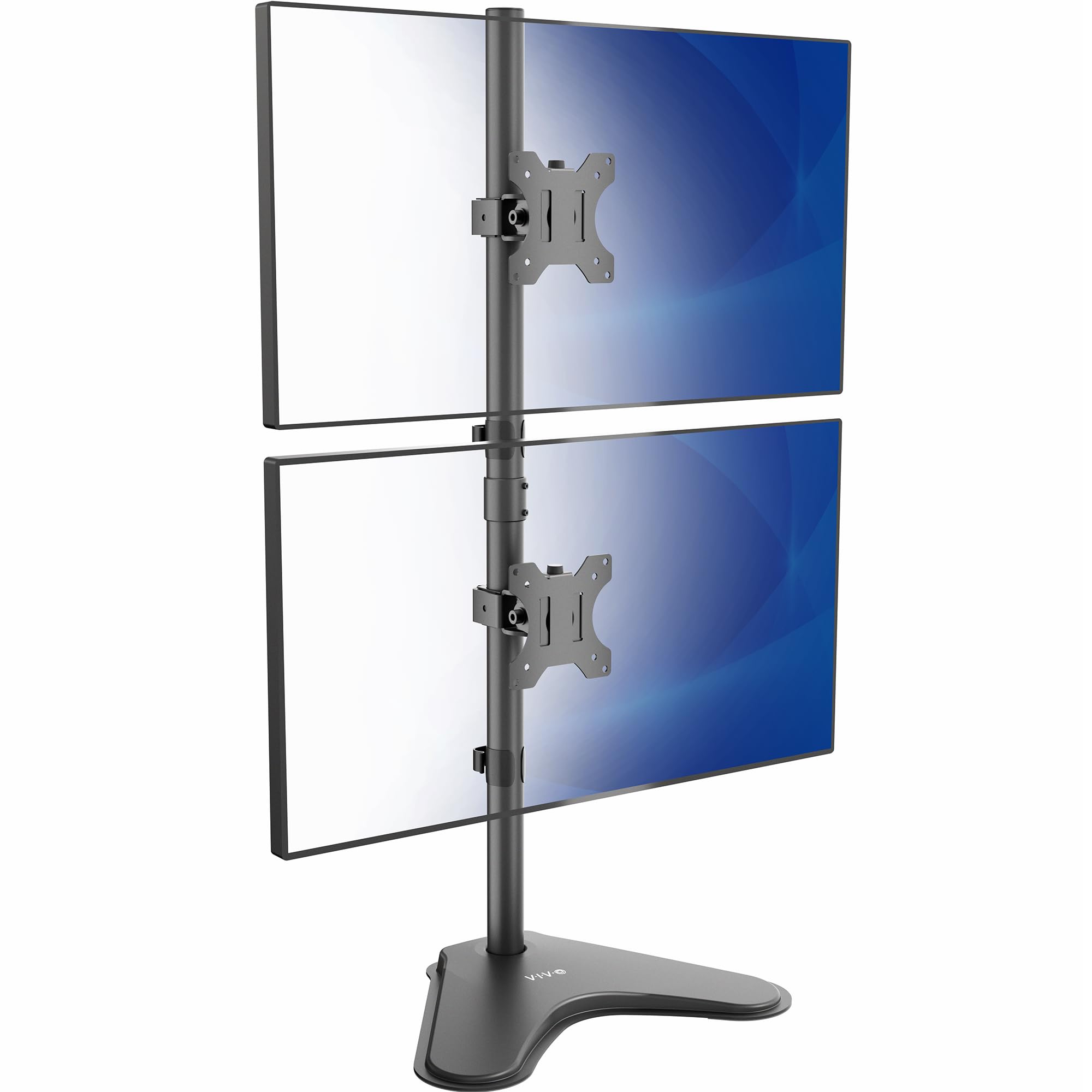
Read Amazon ReviewsVIVO STAND-V002L Vertical Ultrawide Monitor Stand
Choose the STAND-V257R if your two displays are much larger or heavier and your desk can accommodate its clamp or grommet attachment.
The STAND-V002L is a better fit when a freestanding base is preferred and both screens fall within its smaller size and weight limits.
- The STAND-V002L is a freestanding vertical mount for two ultrawide screens from 13 to 34 inches, weighing up to 22 pounds each.
- It has a 15.4-by-12.4-inch base and supports 75x75 or 100x100 mm VESA patterns.
- The STAND-V257R is a desk-mounted clamp or grommet model for two ultrawide screens up to 57 inches, with listed capacities up to 48.4 pounds for curved screens and 59.4 pounds for flat screens.
Computer Monitor Arms alternative
2,000+ ratings
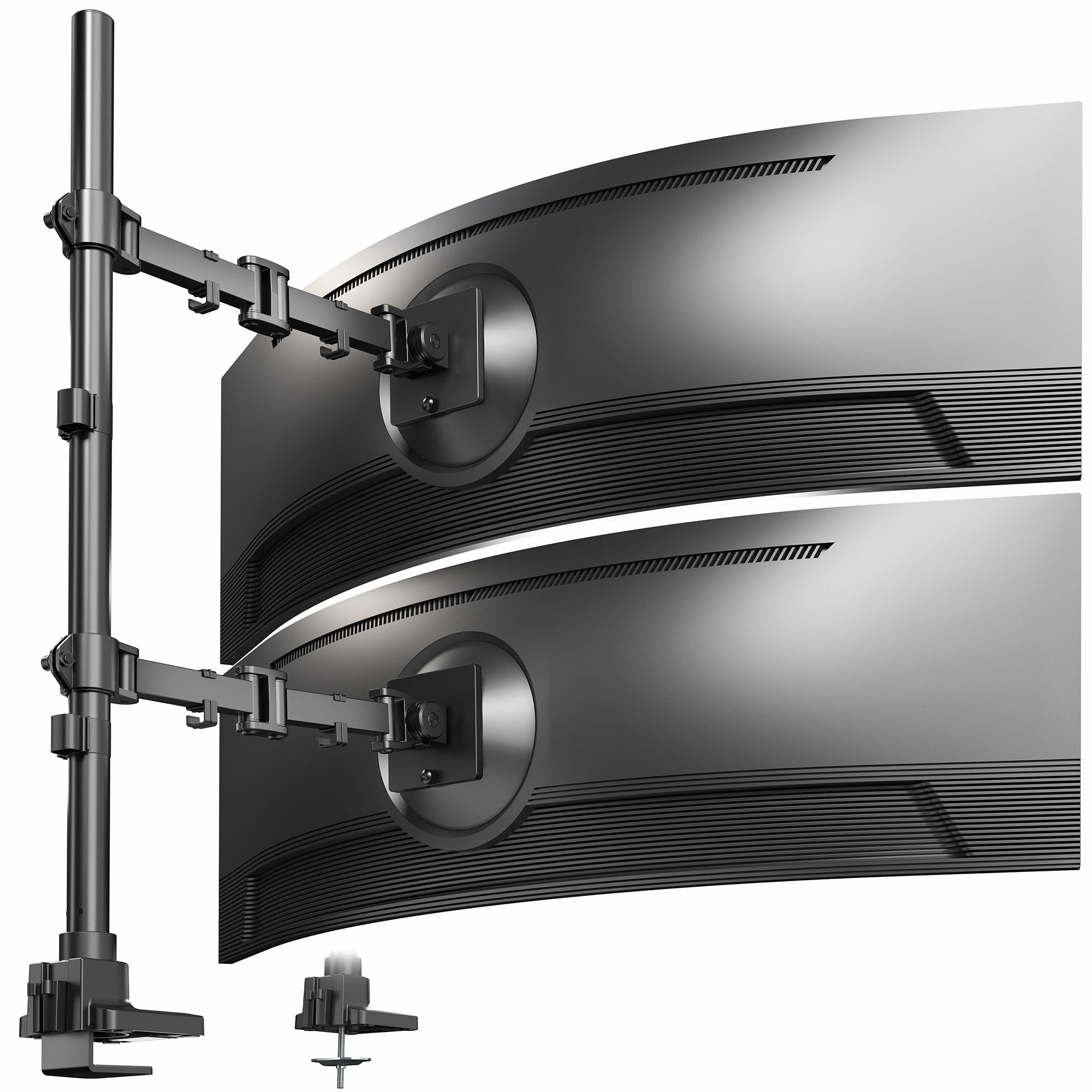
Read Amazon ReviewsVIVO STAND-V120T Dual Ultrawide Monitor Mount
Consider the STAND-V120T if a 49-inch maximum suits your displays and you prefer dual-arm positioning with a broader listed tilt range.
The STAND-V257R is the closer match for a vertical arrangement involving screens larger than 49 inches or flat displays above 44 pounds, provided they remain within its own limits.
- The STAND-V120T supports two ultrawide screens up to 49 inches and 44 pounds each.
- It uses dual arms with +85° to -25° tilt, 180° swivel, 360° rotation, and clamp or grommet desk mounting.
- The STAND-V257R is built for a vertical stack of two screens, with separate movement ranges for its upper and lower arms and support for screens up to 57 inches.
Is VIVO Dual Mount Worth It?
The VIVO STAND-V257R is worth considering when the plan is specifically to stack two very large ultrawide screens and the desk, VESA patterns, and display weights all check out.
Its unusually high screen-size and flat-screen weight limits make it a purpose-built choice for that setup.
Measure first: the clamp and grommet have different thickness limits, and the upper and lower arms do not share identical movement ranges.
If your displays are smaller or you want a freestanding vertical stand, a different mounting style may be a closer fit.
Your review at a glance
2,000+ ratings
Read Amazon ReviewsVIVO STAND-V257R Dual Ultrawide Monitor Mount
A desk-clamped option for people building a vertically stacked setup with two large ultrawide screens or compatible TVs.
- Holds two ultrawide screens in a vertical stack, each up to 57 inches.
- Supports up to 48.4 pounds per curved screen or 59.4 pounds per flat screen.
- Also lists compatibility with TVs up to 43 inches.
- Adjusts with +55° to -35° tilt, up to 132° swivel on the bottom arm, and 360° swivel on the top arm.